'%3e%3cpath%20id='&%23232;&%23129;&%23148;&%23229;&%23144;&%23136;%201'%20d='M42.3535%2036V0H54V36H42.3535ZM25.86%2036C25.7847%2035.9993%2025.7128%2035.9689%2025.6598%2035.9154C25.6069%2035.8618%2025.5773%2035.7895%2025.5775%2035.7142V16.688C25.4952%2016.8247%2025.456%2016.8822%2025.42%2016.9487C22.156%2023.0025%2018.9417%2029.1173%2015.1427%2036H0C0%2036%2021.1467%200%2021.3585%200L35.5915%200.00575C36.2649%200.00938759%2036.9093%200.280274%2037.3831%200.758865C37.8569%201.23746%2038.1212%201.88458%2038.118%202.558V35.7142C38.1182%2035.7515%2038.1111%2035.7885%2038.0971%2035.8231C38.083%2035.8576%2038.0623%2035.889%2038.0361%2035.9156C38.0098%2035.9421%2037.9787%2035.9632%2037.9443%2035.9777C37.9099%2035.9922%2037.873%2035.9998%2037.8358%2036H25.86Z'%20fill='url(%23paint0_linear_212_448)'/%3e%3c/g%3e%3cdefs%3e%3clinearGradient%20id='paint0_linear_212_448'%20x1='27'%20y1='0'%20x2='27'%20y2='36'%20gradientUnits='userSpaceOnUse'%3e%3cstop%20stop-color='%230469FF'/%3e%3cstop%20offset='1'%20stop-color='%236004A9'/%3e%3c/linearGradient%3e%3cclipPath%20id='clip0_212_448'%3e%3crect%20width='54'%20height='36'%20fill='white'/%3e%3c/clipPath%3e%3c/defs%3e%3c/svg%3e)


'/%3e%3cpath%20d='M9.20607%2011.18H8.22507L5.36907%206.84001V11.19H4.38007V5.00001H5.37007L8.23407%209.35001V5.00001H9.21507L9.20607%2011.18ZM14.7511%206.00001H11.6581V7.49001H14.4581V8.49001H11.6581V10.1H14.7501V11.1H10.6691V5.00001H14.7421L14.7511%206.00001ZM22.0121%2011.16H21.0221L19.6641%206.56701L18.3061%2011.177H17.3251L15.5731%204.99701H16.6421L17.8001%209.43001L19.1311%205.00001H20.2001L21.4791%209.43001L22.6441%205.00001H23.7201L22.0121%2011.16Z'%20fill='white'/%3e%3cdefs%3e%3clinearGradient%20id='paint0_linear_335_20214'%20x1='0'%20y1='0'%20x2='13.2875'%20y2='24.913'%20gradientUnits='userSpaceOnUse'%3e%3cstop%20stop-color='%231774FE'/%3e%3cstop%20offset='1'%20stop-color='%238F06FB'/%3e%3c/linearGradient%3e%3c/defs%3e%3c/svg%3e)


🤩Never miss an offer again!
Be part of our Club: The free Nero newsletter informs you about the latest Nero products and exclusive offers.
One click to make photos clear, sharp, and rich in fine details, perfect for enhancing features like fur, hair, and pupils.
Drag & drop to upload your images
No image on hand?
Try one of these
Or use our AI Photo Sharpener App locally on your devices.





'/%3e%3cdefs%3e%3clinearGradient%20id='paint0_linear_239_205'%20x1='32.1059'%20y1='15.9995'%20x2='32.1059'%20y2='47.1635'%20gradientUnits='userSpaceOnUse'%3e%3cstop%20stop-color='%230086FF'/%3e%3cstop%20offset='1'%20stop-color='%23740B96'/%3e%3c/linearGradient%3e%3c/defs%3e%3c/svg%3e)
Processed total

Processed in last 24h
'/%3e%3cdefs%3e%3clinearGradient%20id='paint0_linear_239_222'%20x1='7'%20y1='35'%20x2='60'%20y2='35'%20gradientUnits='userSpaceOnUse'%3e%3cstop%20stop-color='%230086FF'/%3e%3cstop%20offset='1'%20stop-color='%23740B96'/%3e%3c/linearGradient%3e%3c/defs%3e%3c/svg%3e)
Average processing time

Users in last 24h


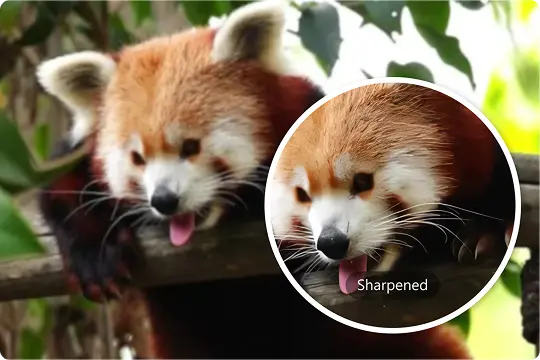
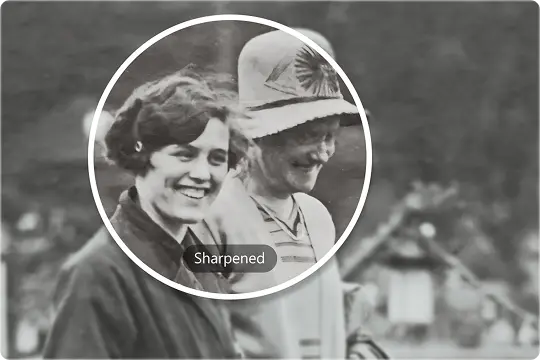
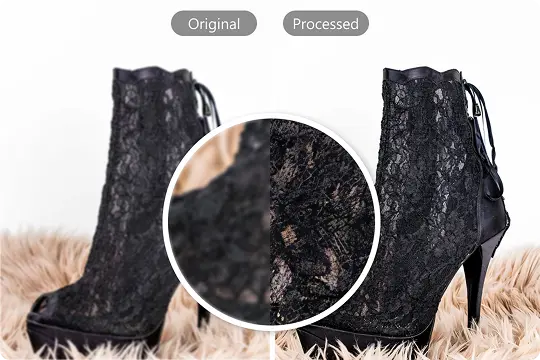
Nero AI Image Sharpener enhances your photos with just a few clicks. It uses AI to automatically sharpen blurry or low-quality images, bringing out fine details and improving clarity.
Perfect for both personal and professional use, it quickly transforms pixelated or old images, making them look fresh and polished.
Yes, it's completely safe. We delete uploaded files and processed images after 8 hours. Your files remain private, and no one else can access them—your privacy is 100% guaranteed.
JPG, JPEG, PNG, BMP, WebP, JFIF, JFI, JPE, JIF, ICO files are supported for Nero AI Image Sharpener.
Here's how to use Nero AI Image Sharpener:
We support online batch processing mode.
For consumer users we support uploading 5/20/30/40/50 images at one time, for Business users we support uploading 200 images at one time. Become a Business user →
After clicking the upload button, select multiple images to upload at one time. The page loads into the batch processing interface, here you can start processing each image separately or click Start All to start processing all images at once.
When the image processing is finished, the blue SUCCESS mark will appear on the completed tasks, you can choose to Download All the images or download each image separately.
For users who don't want to spend time waiting, they can choose to receive the processed images by email. In the History screen, select Receive processed images by email, and we will send the images to the left email address after the processing is finished.
Blurry portraits or low-quality photos that don't need to be bigger.
Images with bokeh backgrounds or motion blur effects are not suitable.
We offer 10 free trial Nero Credits for new users. Image processing requires Credits, and for this page, each processing consumes 4 Credit.
After you have used up your free Credits, you can refill here.
Be part of our Club: The free Nero newsletter informs you about the latest Nero products and exclusive offers.
'%20fill='%23FDB03B'/%3e%3c/svg%3e)