'%3e%3cpath%20id='&%23232;&%23129;&%23148;&%23229;&%23144;&%23136;%201'%20d='M42.3535%2036V0H54V36H42.3535ZM25.86%2036C25.7847%2035.9993%2025.7128%2035.9689%2025.6598%2035.9154C25.6069%2035.8618%2025.5773%2035.7895%2025.5775%2035.7142V16.688C25.4952%2016.8247%2025.456%2016.8822%2025.42%2016.9487C22.156%2023.0025%2018.9417%2029.1173%2015.1427%2036H0C0%2036%2021.1467%200%2021.3585%200L35.5915%200.00575C36.2649%200.00938759%2036.9093%200.280274%2037.3831%200.758865C37.8569%201.23746%2038.1212%201.88458%2038.118%202.558V35.7142C38.1182%2035.7515%2038.1111%2035.7885%2038.0971%2035.8231C38.083%2035.8576%2038.0623%2035.889%2038.0361%2035.9156C38.0098%2035.9421%2037.9787%2035.9632%2037.9443%2035.9777C37.9099%2035.9922%2037.873%2035.9998%2037.8358%2036H25.86Z'%20fill='url(%23paint0_linear_212_448)'/%3e%3c/g%3e%3cdefs%3e%3clinearGradient%20id='paint0_linear_212_448'%20x1='27'%20y1='0'%20x2='27'%20y2='36'%20gradientUnits='userSpaceOnUse'%3e%3cstop%20stop-color='%230469FF'/%3e%3cstop%20offset='1'%20stop-color='%236004A9'/%3e%3c/linearGradient%3e%3cclipPath%20id='clip0_212_448'%3e%3crect%20width='54'%20height='36'%20fill='white'/%3e%3c/clipPath%3e%3c/defs%3e%3c/svg%3e)


'/%3e%3cpath%20d='M9.20607%2011.18H8.22507L5.36907%206.84001V11.19H4.38007V5.00001H5.37007L8.23407%209.35001V5.00001H9.21507L9.20607%2011.18ZM14.7511%206.00001H11.6581V7.49001H14.4581V8.49001H11.6581V10.1H14.7501V11.1H10.6691V5.00001H14.7421L14.7511%206.00001ZM22.0121%2011.16H21.0221L19.6641%206.56701L18.3061%2011.177H17.3251L15.5731%204.99701H16.6421L17.8001%209.43001L19.1311%205.00001H20.2001L21.4791%209.43001L22.6441%205.00001H23.7201L22.0121%2011.16Z'%20fill='white'/%3e%3cdefs%3e%3clinearGradient%20id='paint0_linear_335_20214'%20x1='0'%20y1='0'%20x2='13.2875'%20y2='24.913'%20gradientUnits='userSpaceOnUse'%3e%3cstop%20stop-color='%231774FE'/%3e%3cstop%20offset='1'%20stop-color='%238F06FB'/%3e%3c/linearGradient%3e%3c/defs%3e%3c/svg%3e)


🤩Never miss an offer again!
Be part of our Club: The free Nero newsletter informs you about the latest Nero products and exclusive offers.
Remove the background of images & photos with 1-click
Drag & drop to upload your images
No image on hand?
Try one of these


'/%3e%3cdefs%3e%3clinearGradient%20id='paint0_linear_239_205'%20x1='32.1059'%20y1='15.9995'%20x2='32.1059'%20y2='47.1635'%20gradientUnits='userSpaceOnUse'%3e%3cstop%20stop-color='%230086FF'/%3e%3cstop%20offset='1'%20stop-color='%23740B96'/%3e%3c/linearGradient%3e%3c/defs%3e%3c/svg%3e)
Processed total

Processed in last 24h
'/%3e%3cdefs%3e%3clinearGradient%20id='paint0_linear_239_222'%20x1='7'%20y1='35'%20x2='60'%20y2='35'%20gradientUnits='userSpaceOnUse'%3e%3cstop%20stop-color='%230086FF'/%3e%3cstop%20offset='1'%20stop-color='%23740B96'/%3e%3c/linearGradient%3e%3c/defs%3e%3c/svg%3e)
Average processing time

Users in last 24h


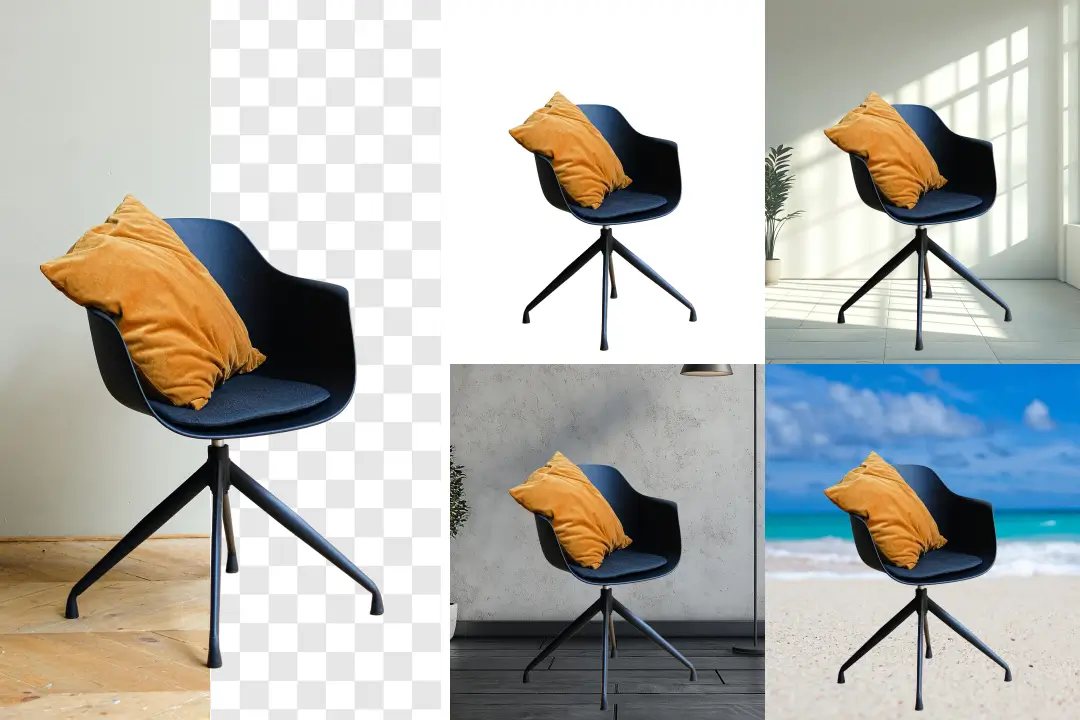

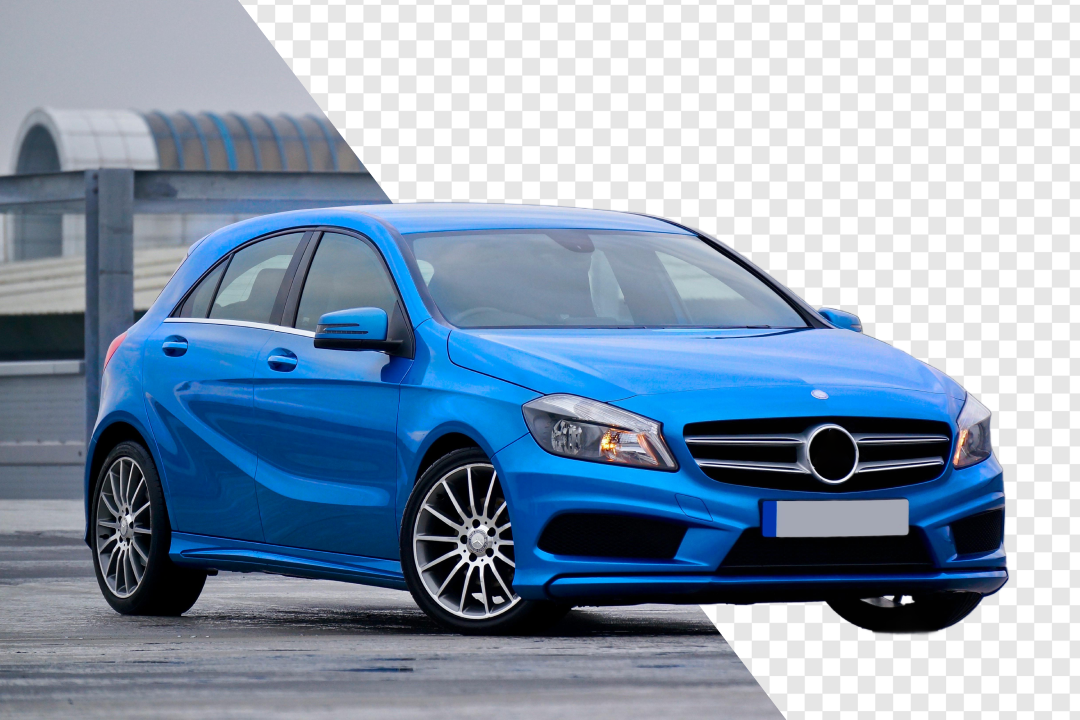
Nero AI Background Remover provides an online service for removing backgrounds from images and replacing backgrounds. We support uploading images that you want to remove the background from, our AI algorithm will automatically recognize the subject in the image and remove the background while retaining the details of the subject as much as possible, and we support online preview and download of the processed result image to local.
If you want to further edit the image with the background removed, click the Edit button to enter the editing interface.
We support solid colors as well as custom backgrounds, and we support stretching, zooming, and rotating the subject of the image.
We support online batch processing mode.
For consumer users we support uploading 5/20/30/40/50 images at one time, for Business users we support uploading 200 images at one time. Become a Business user →
After clicking the upload button, select multiple images to upload at one time. The page loads into the batch processing interface, here you can start processing each image separately or click Start All to start processing all images at once.
When the image processing is finished, the blue SUCCESS mark will appear on the completed tasks, you can choose to Download All the images or download each image separately.
For users who don't want to spend time waiting, they can choose to receive the processed images by email. In the History screen, select Receive processed images by email, and we will send the images to the left email address after the processing is finished.
We have integrated an API for this feature, and can support integrating our API into your own applications or code, designed for developers, click here for more information.
If you want to enhance other information in the photo and increase the resolution, you can go to Nero AI Image Upscaler, which provides a variety of models to enhance the details of different types of images.
New users get 10 free Nero Credits. Each image processing typically uses 1 credit, but final cost may vary based on your settings.
After you have used up your free Credits, you can refill here.
Be part of our Club: The free Nero newsletter informs you about the latest Nero products and exclusive offers.
'%20fill='%23FDB03B'/%3e%3c/svg%3e)